Chat Ops
Chat Ops turns the dashboard itself into an AI agent that operates your cloudlet. You describe what you want in plain English, and it does the work - creating endpoints, querying your databases, reading your log, editing files - reporting every action it took as it goes.
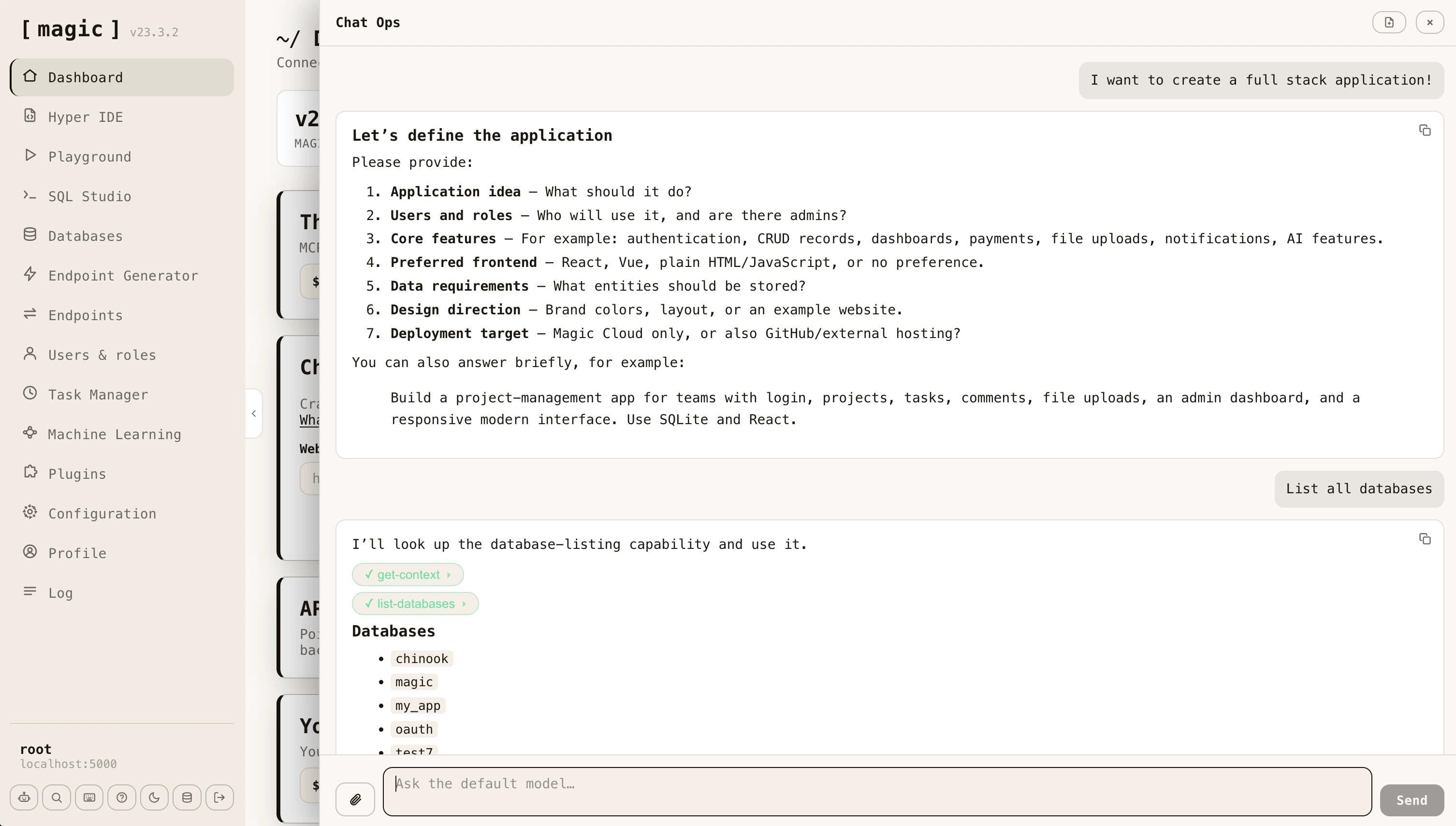
This is the same capability you get by connecting an AI client such as Claude to your cloudlet over MCP, except the client is the dashboard you are already signed in to. There is nothing to connect, and no orchestrator subscription required - only an OpenAI API key.
Opening Chat Ops
Click the robot button at the bottom of the navigation, or press CTRL+. (COMMAND+. on a Mac) from anywhere in the dashboard. The panel opens over whatever you were doing and closes again without losing your place.
Chat Ops only appears once Magic has been configured with an OpenAI API key, since it needs a model to talk to. If you cannot see it, add your key in the Configuration component and reload the dashboard.
What it can do
Chat Ops talks to your cloudlet’s default machine learning model, which ships with a library of AI functions - the same built-in tools your cloudlet exposes over MCP. This means it can do the things you would otherwise do by hand across several components.
- Build backends - generate Hyperlambda, crudify a database table into a complete CRUD API, create modules and SQL endpoints
- Work with data - list databases, read a schema, run SQL, create SQLite databases and backups
- Handle files - read, create and search files in your cloudlet, and download files from the web
- Diagnose problems - read the log to find out why something failed, and invoke an endpoint to see what it actually returns
- Administer the cloudlet - create users and roles, schedule background tasks, install plugins, send email
Ask for an outcome rather than a step. “Create a REST API for the Album table in my chinook database, restricted to the admin role” is a better prompt than a sequence of individual instructions, because the agent will look up the schema, generate the endpoints, and tell you what it created.
Seeing what it did
Every function the agent invokes appears in the conversation as a pill naming that function. Click a pill and it expands to show the exact JSON payload that was sent - so you can always audit what happened rather than trusting a summary.
Answers are rendered as Markdown, and any Hyperlambda in them is syntax highlighted, so generated code is readable without copying it elsewhere. When a function produces a file, a download button appears alongside it.
Attaching files
Click the paperclip to attach up to five files to a message. Attachments are previewed before you send, and can be removed while composing. This lets you hand the agent a spreadsheet, a screenshot, a PDF or a code file and ask it to work from that.
Security
Chat Ops executes as the user you are signed in as. Every AI function it invokes goes through the same JWT authentication and role based access control as any other request to your cloudlet, so the agent can never do anything you could not do yourself. If you are signed in as root, it has root access - which is worth remembering before asking it to delete things.
The model itself never receives your OpenAI API key, your connection strings, or your JWT. The agent loop runs server-side inside your cloudlet, and only the conversation and the function results travel back to the browser.
Related
- Machine Learning - manage the
defaultmodel Chat Ops uses, and add AI functions of your own - MCP Server - give an external AI client the same capabilities
- Configuration - where you add your OpenAI API key
Frequently asked questions
What is Chat Ops?
An AI agent built into the dashboard that operates your cloudlet for you. Unlike a chatbot that answers questions, Chat Ops invokes your cloudlet's AI functions - creating endpoints, running SQL, reading the log, and managing files - and shows you every action it took.
How do I open Chat Ops?
Click the robot button at the bottom of the navigation, or press CTRL+. (COMMAND+. on a Mac) anywhere in the dashboard. It only appears once you have configured Magic with an OpenAI API key.
What can Chat Ops actually do?
Anything your cloudlet exposes as an AI function - generate and execute Hyperlambda, crudify a database table into a REST API, run SQL, read and write files, read the log to diagnose a failure, manage users and roles, and schedule tasks.
Is it safe to let it act on my cloudlet?
It runs as the user you are signed in as, so it can only do what you can do - the same role based access control that governs every other part of Magic. Every function it invokes is shown as a pill you can expand to see exactly what was sent.
How is Chat Ops different from Frank?
Frank is AINIRO's support agent - he answers questions about Magic and Hyperlambda. Chat Ops operates your cloudlet. Frank tells you how to do something, Chat Ops does it.
How is it different from connecting Claude over MCP?
It is the same idea from the other direction. Over MCP an external AI client drives your cloudlet; with Chat Ops the dashboard itself is the client, so you get the same capability without connecting anything - and with no orchestrator subscription.
Can I give it files?
Yes. Attach up to five files to a message - images, PDFs, spreadsheets, code - and the model can analyse them as part of the conversation.