Endpoint Generator
The Endpoint Generator component allows you to automatically generate an HTTP CRUD web API wrapping your database of choice. The endpoint generator component works by reading meta data from your database, which it then uses to generate Hyperlambda HTTP endpoints for you automatically.
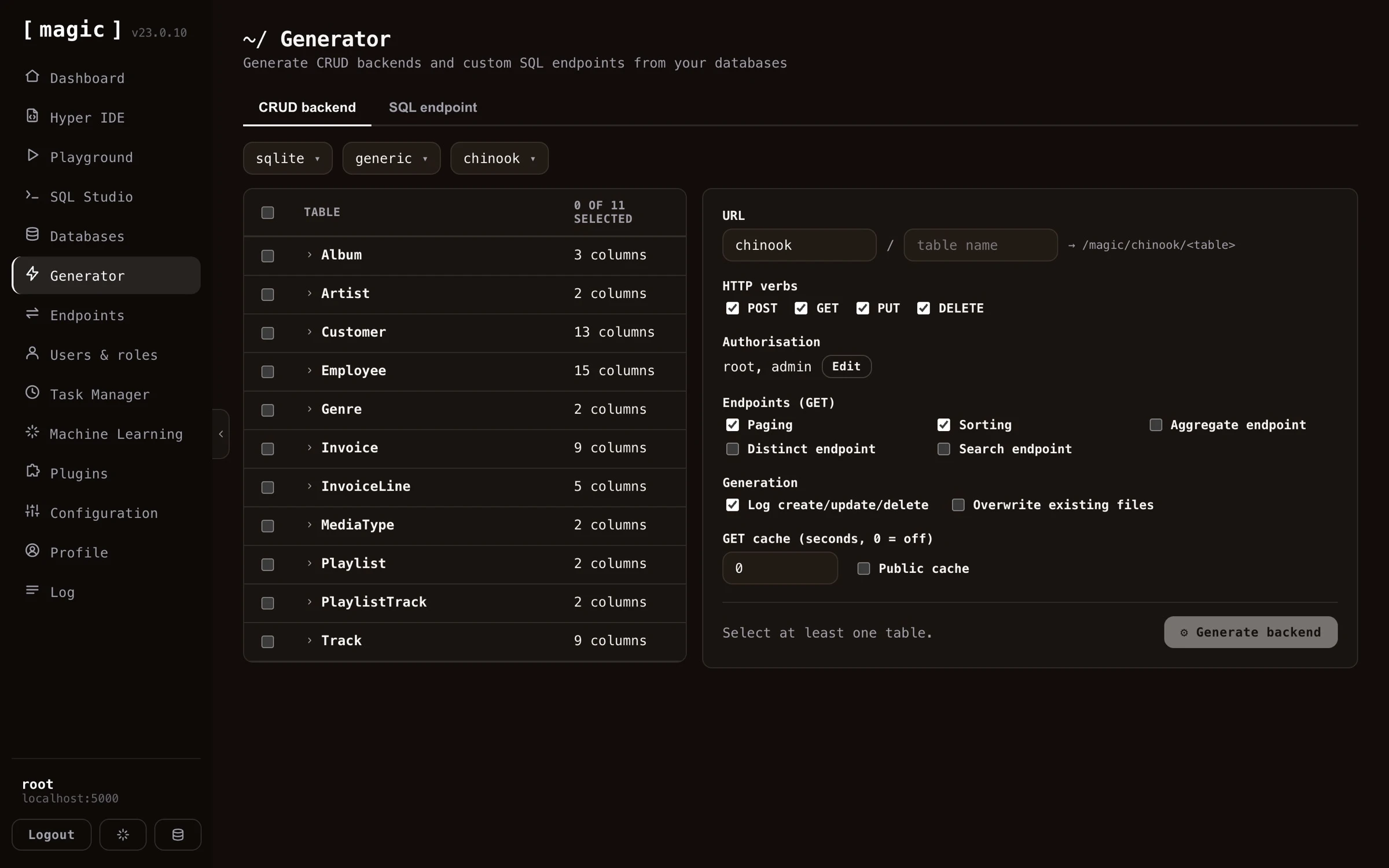
If you use the generator on for instance the “SQLite Sakila” database that you can find as a plugin, Magic will create more than 3,000 lines of Hyperlambda code for you automatically, resulting in some roughly 100 HTTP endpoints for you, providing you with all CRUD operations towards all tables in your database.
Magic can also generate an API wrapping your existing databases. If you want to use your existing databases as input, you’ll have to provide Magic with a connection string that allows it to connect to your database. You can do this through the databases component.
The API Wizard - the guided flow
The fastest way to use the generator is through the “API Wizard” card on the dashboard’s landing page. This starts a guided version of the Endpoint Generator, walking you through three steps - choose data, generate, and done. The guided flow preselects every table in your database, since that is almost always what you want when creating an API from scratch, and if you haven’t got a database of your own yet, it points you to the databases component to create or connect one first.
When generation is done, the guided flow tells you how many endpoints it created and where they live, and links you directly to the endpoints component - filtered to your new module such that you can try your API immediately - and to users and roles, where you control who is allowed to invoke it.
How to use the endpoint generator
To use the endpoint generator component you must first select a database. Then you can optionally configure the CRUD process for individual tables, such as configuring what URL your CRUD API should use, whether or not to turn on caching of HTTP GET endpoints, what authorisation requirements each endpoint should have, etc.
Notice, if you deselect all tables and select only one table, you get a lot more options to choose from. This is useful if you need additional control over how your API endpoints are generated, and what results the endpoint generator should give you.
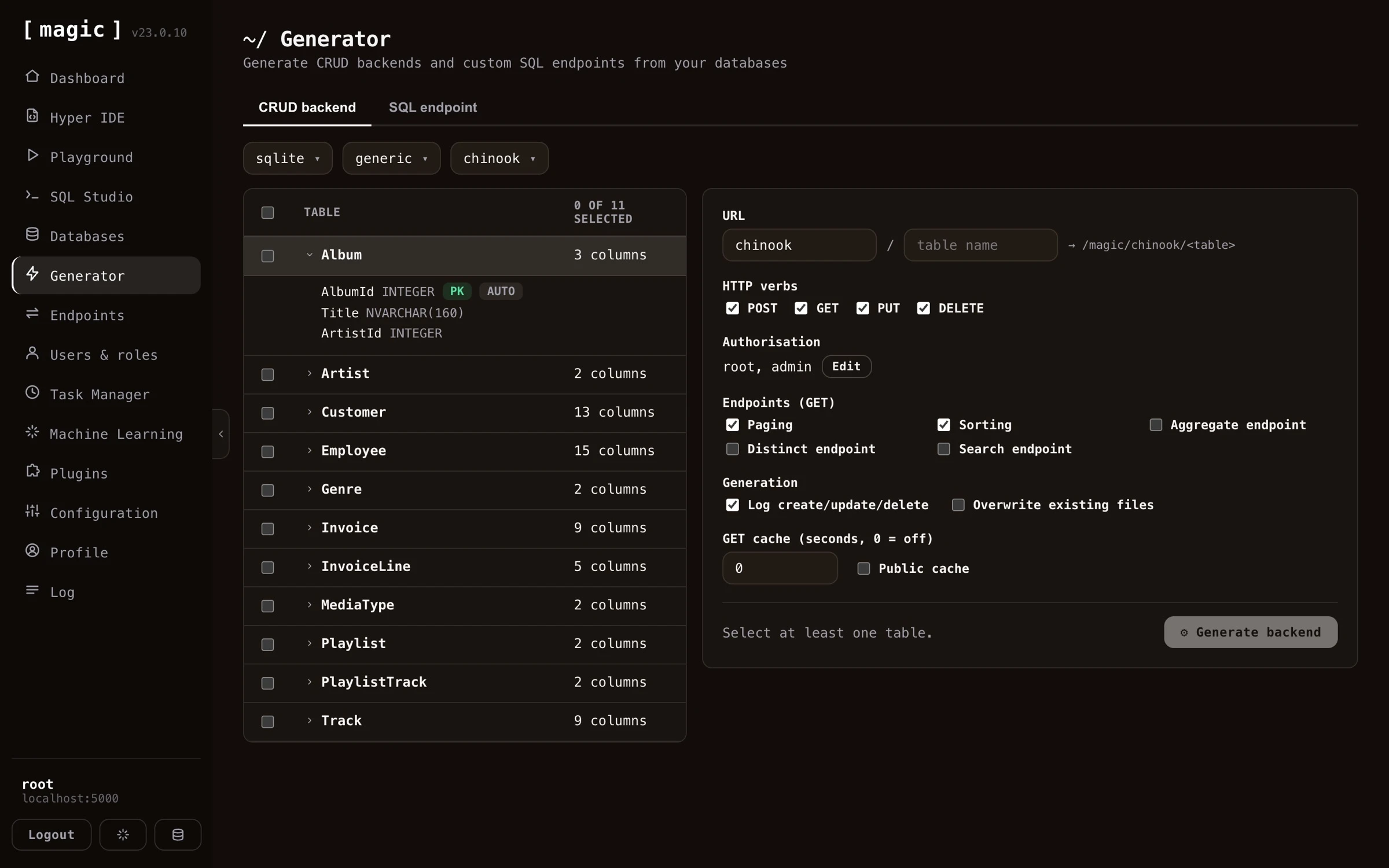
The Endpoint Generator creates 5 HTTP endpoints by default for each table. One endpoint for each CRUD operation, and a 5th endpoint to count items. If your table does not have a primary key, it will not be able to generate delete or update endpoints. If your primary key has a default value, it will not generate endpoint code requiring a primary key value for its create endpoints. In general, the endpoint generator tries to intelligently choose defaults for your tables as it generates your backend. However, it is not always able to choose correctly for you, so you might want to sanity check its result after you’ve generated your backend.
Additional endpoint types
In addition to the standard CRUD endpoints, the generator can optionally create a few extra query endpoints for a table. You enable these per table before you generate your backend.
- Aggregate - Creates an endpoint that returns the minimum, maximum, average, sum, or count for a column you specify, grouped by another column. The grouping column is mandatory, so the endpoint always returns your aggregate value per group. This lets you produce totals and statistics directly from your database, without writing any SQL yourself.
- Distinct - Creates an endpoint that returns the unique, distinct values from a column, allowing you to list every value that occurs in a column without duplicates.
- Search - Creates an endpoint that performs a “keyword density search” across your table, ranking each row by how many of your keywords it matches, and sorting the result by “most matches” first. This gives you a simple relevance-ranked, full-text style search endpoint out of the box. Keyword density search is actually a good substitute for RAG and VSS - it requires no embeddings, no vector database, and no AI inference, yet often yields surprisingly relevant results, making it a great low-cost alternative when you need search but don’t need semantic understanding.
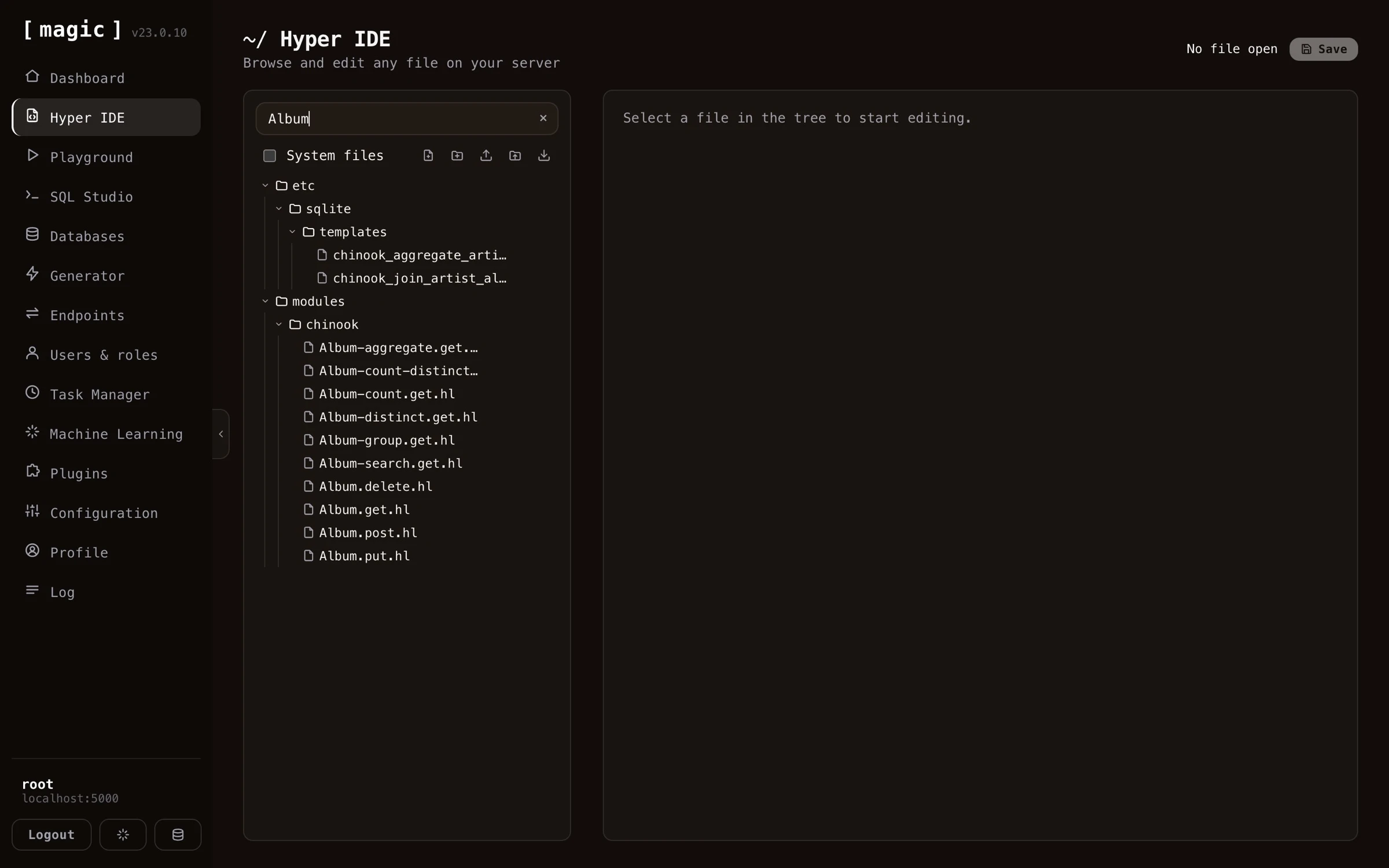
Below is how the result looks like in Hyper IDE after having generated all endpoint types for a table - one Hyperlambda file per endpoint, including the count, distinct, aggregate, group, and search endpoints.
Endpoint generator settings
Once you have selected a database and a table, you can override individual settings for how Magic should create CRUD endpoints wrapping your specified table. You can also turn on or off specific columns, preventing Magic from accepting values for these columns, also for individual CRUD verbs. If you have a read only type of column for instance, that should only be set during “create” invocations, you can easily remove that field from your “update” endpoint, making sure Magic does not accept new values to that column when its update endpoint is invoked.
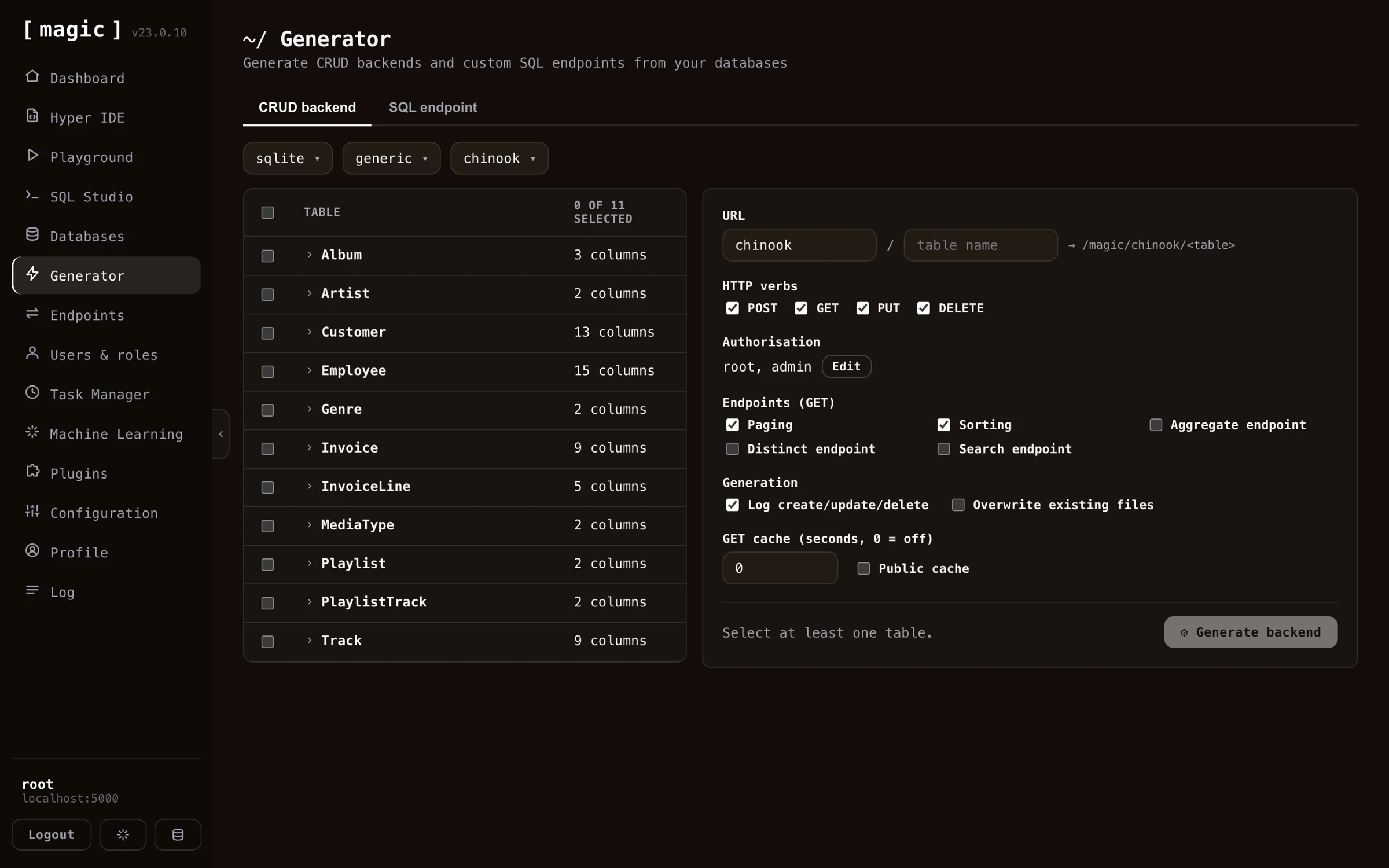
You can also override what URLs your endpoints should use, what authorisation requirements your endpoints should have, in addition to a lot of other settings, such as turning on logging, caching, etc.
Endpoint generator settings complete list
Below is a complete list of what settings you can apply when generating your endpoints. Notice, some of these settings are only possible to apply if you’ve selected only one table.
- What fields each CRUD endpoint accepts
- Authorisation requirements for each CRUD endpoint, allowing you to declare which role a user must have to be able to invoke your endpoints
- Primary and secondary URL, allowing you to tell the backend generator what URLs to generate for a particular table
- Paging and sorting, allowing you to turn on or off paging of data and sorting of data
- Additional GET endpoints, such as aggregate, distinct, and search endpoints, giving you more ways to query your table
- Turning on or off logging when your create, update and delete endpoints are invoked
- Caching, implying HTTP cache, or the “Cache-Control” HTTP header, and whether or not to turn on public cache or not, where public caching allows proxies to cache your endpoint’s result. Notice, caching is only applied to GET endpoints in this component
- Overwrite, which if true, will overwrite an existing endpoint. By default, the endpoint generator will not overwrite existing files unless you explicitly tell it to do so
Endpoint generator internals
The endpoint generator will actually create 5 files for you, one file for each CRUD verb, and one file to count items. These files will be Hyperlambda files, and you can see these after the process is done by using Hyper IDE and expand your “modules” folder. The generated Hyperlambda will basically be wrappers around the [data.connect] slot, in addition to one of the following slots, depending upon which CRUD verb the file you’re looking at is wrapping.
- [data.create] - The Hyperlambda slot for creating new items in your database
- [data.read] - The Hyperlambda slot for reading items from your database
- [data.update] - The Hyperlambda slot for updating items in your database
- [data.delete] - The Hyperlambda slot for deleting items from your database
The SQL endpoint generator
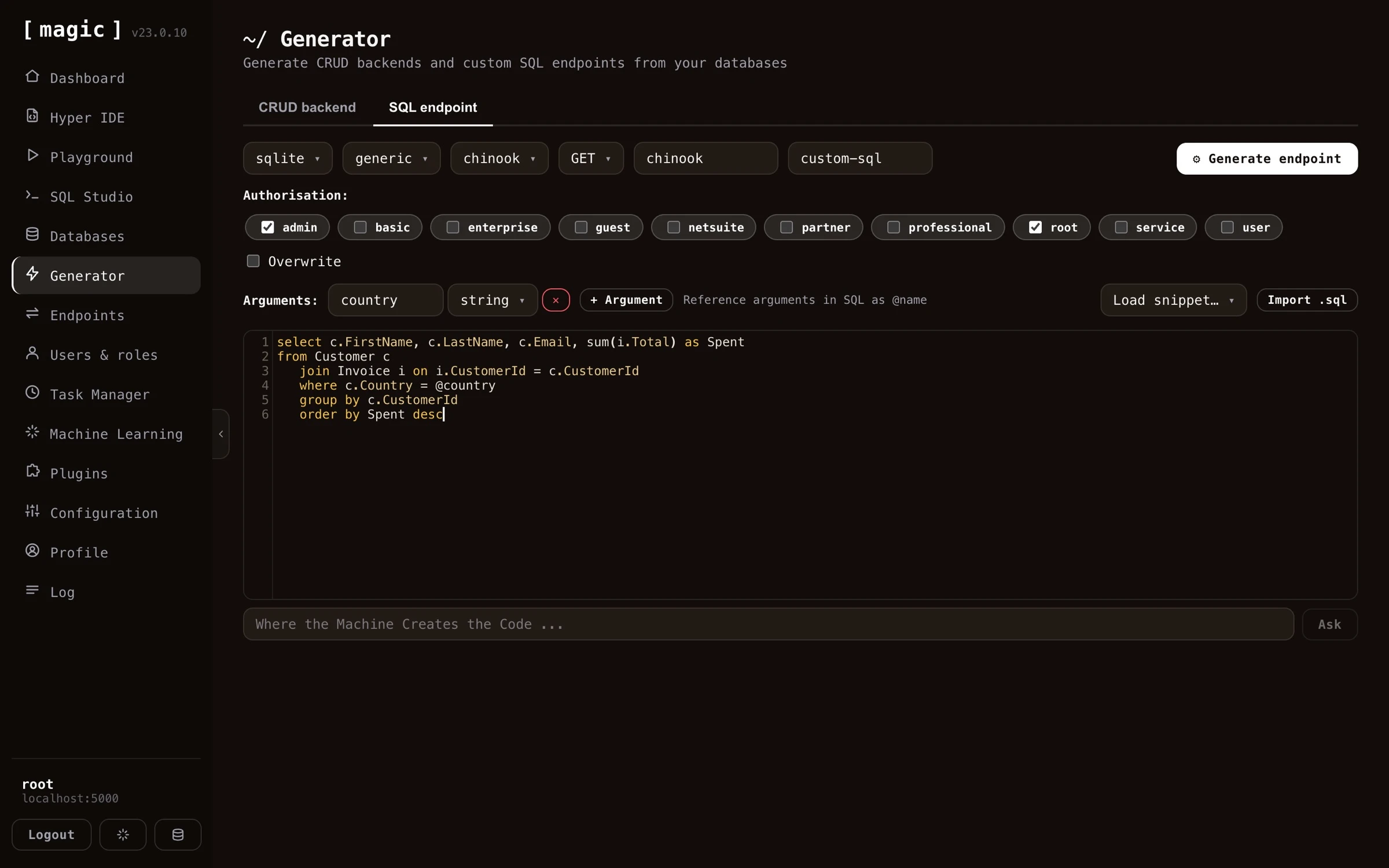
The SQL endpoint generator component allows you to generate an API endpoint wrapping an SQL statement. It is similar to the endpoint generator, but instead of automatically creating your SQL, it allows you to provide your own custom SQL, and then securely wrap your SQL into an HTTP endpoint. It allows you to create endpoints wrapping any of the 5 most popular HTTP verbs, takes care of authentication and authorisation, in addition to that it allows you to declare arguments to your endpoints.
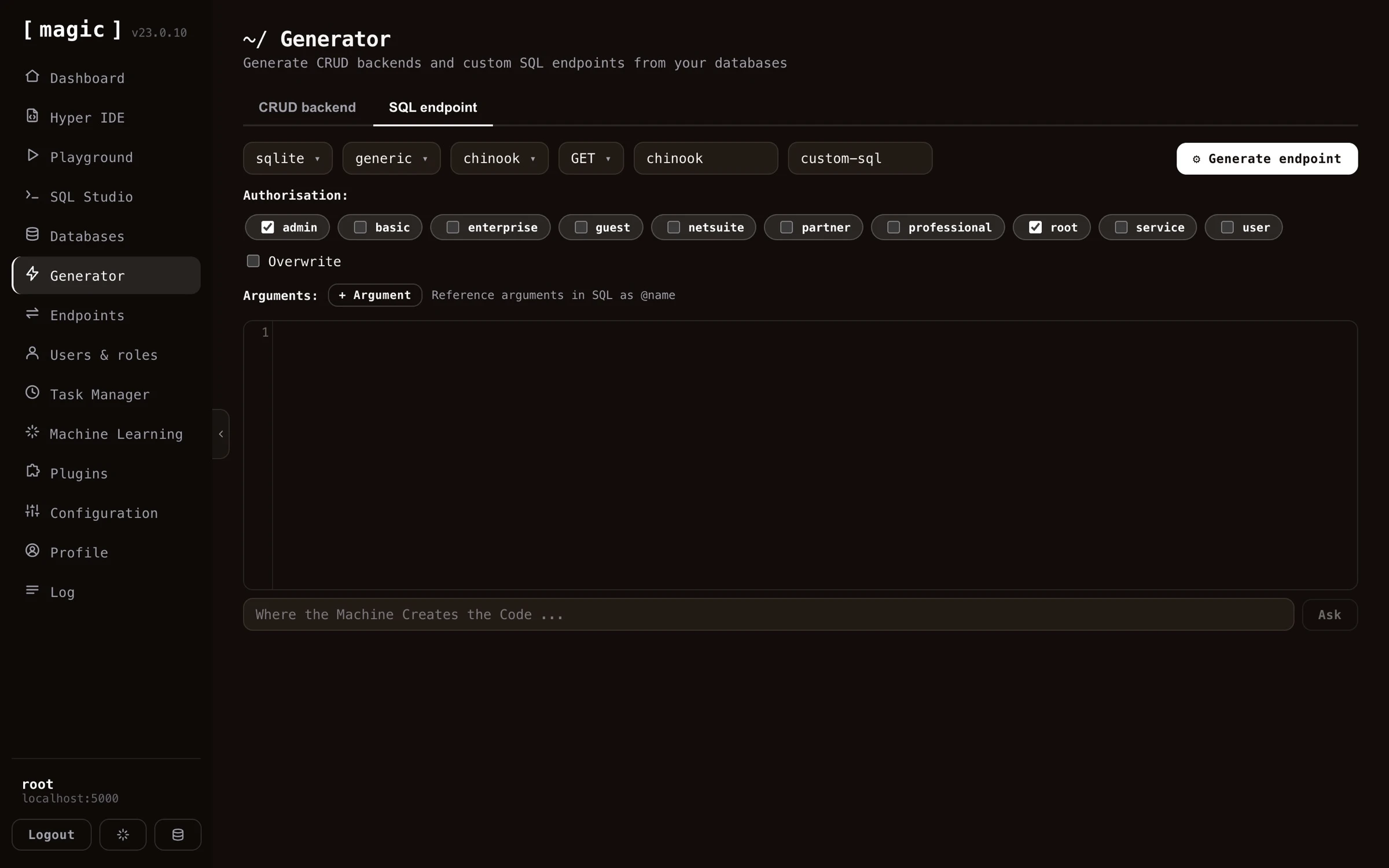
Notice, you don’t have to write the SQL yourself. Below the SQL editor you’ll find an input textbox that says “Where the Machine Creates the Code” - describe the query you want in plain English, click “Ask”, and the AI generates the SQL for you, aware of your selected database and its schema. If the editor already contains SQL, your prompt is treated as a change instruction, allowing you to iterate until the query does exactly what you want, before wrapping it into an HTTP endpoint.
How to use the SQL endpoint generator
You can find the SQL endpoint generator as an additional tab inside your endpoint generator. The SQL generator is much simpler to understand than the endpoint generator, since it has much less settings you can apply. However, the SQL endpoint generator obviously requires that you’ve got a solid understanding of SQL. The process to use the SQL endpoint generator to create an endpoint is as follows.
- Choose your database
- Choose an HTTP verb
- Choose URL(s) for your endpoint
- Select which roles are authorised to invoke your endpoint (optional)
- Provide arguments to your endpoint (optional)
- Write your SQL referencing arguments if you provided arguments in the above step
When you’re done with the above, simply click the “Generate” button, and you’ve got an HTTP endpoint wrapping your SQL.
Settings for the SQL generator
The SQL generator allows you to override authorisation requirements, the URL of your endpoint, and which arguments your endpoint requires. The last part is important since it allows you to add arguments to your endpoint that you can reference in your SQL somehow. To reference an argument in your SQL, prefix your argument’s name with an at character (@), implying if your argument is named “foo”, you’ll have to reference your argument in your SQL as “@foo”.
Notice, arguments supplied to your SQL endpoint are obviously mandatory, since once you’ve generated your endpoint, there are no known mechanisms for removing the argument from your SQL. However, your arguments could be supplied as null values, at which point the resulting SQL would use the value null as a substitute for your argument.
The Sandbox API generator
The “Sandbox API” tab generates a single endpoint that safely executes code its own callers supply. Where the CRUD and SQL generators turn your data and your SQL into fixed endpoints, the Sandbox API publishes one endpoint that accepts Hyperlambda - or a plain-English instruction it turns into Hyperlambda - from whoever calls it, and runs it inside a whitelist that decides, function by function, what that code is allowed to do. The caller never gets more power than the roles you granted, and a function you did not grant simply does not exist as far as their code is concerned.
This is the same mechanism behind the public Natural Language API demonstration, generalised so you can shape the vocabulary, the rate limit and the timeout per role, and mount it at a URL of your choice.
Input - Hyperlambda, natural language, or both
The “Input” selector decides what the generated endpoint accepts, and your choice is reflected both in the endpoint’s arguments and in its documentation.
- Hyperlambda - the endpoint takes a [hyperlambda] argument and executes it as-is
- Natural language - the endpoint takes an [instruction] argument, sends it to the Hyperlambda Generator for code, and executes the result
- Both - the endpoint accepts either; a non-empty [instruction] is used when present, otherwise the [hyperlambda] argument
Whichever you choose, the generator writes a matching file level comment and argument comments, so the endpoint documents itself - and, because it becomes an MCP tool, so does the tool an AI agent sees.
How the code is checked and run
Every request goes through the same pipeline.
- Verify - the code is parsed and every function it references is checked against the functions that actually exist on this server. A hallucinated function stops here, before anything runs.
- Execute - the code runs inside a [whitelist] whose vocabulary is chosen from the caller’s roles. A function that is not in the vocabulary does not resolve, and an argument that is pinned - such as a database name - must match exactly.
- Return - the response always carries a [state] saying what happened, the [result] the code produced, and a [reason] when the runtime refused the code or it failed.
The possible states are described (a call that asked what is permitted), executed, rejected (a function or a pinned argument was not allowed), unknown-slot (a referenced function does not exist), error (the code threw), timeout (execution exceeded the configured limit), and generator-failed (no code came back from the generator).
The policy - base vocabulary plus per-role grants
What the sandbox can reach is defined by a policy you build in the component, made of an “everybody” base rule plus any number of per-role rules.
- Everybody (base vocabulary) - the language every caller gets, seeded for you with a safe set of pure, data-shaping functions (mirroring the public Natural Language API’s vocabulary, minus database and HTTP access). It also carries the fallback rate limit and timeout.
- Role rules - each adds more functions on top of the base for callers in that role. This is how you grant your CEO’s role access to one database while your HR role cannot reach it - both keep the base language, and each role’s extra functions are added to it.
The vocabulary a given caller runs with is the union of every rule they match, so capabilities compose. The rate limit and the timeout are resolved independently - each is taken from the first matching rule, top to bottom, that declares it, so you order your rules most-privileged first and never have to calculate a maximum. The base rule sits last as the fallback for both.
Functions are written one per line. A bare name such as data.read grants the function; a name with a value such as data.connect:northwind pins its primary argument - here restricting database access to exactly the northwind database. File and folder functions pin their path the same way. A function that takes a file takes a filename, so io.file.load:/etc/reports/*.csv grants loading the CSV files directly in that folder, while io.file.load:/etc/reports/summary.csv grants exactly one file. A folder function takes a folder, which ends with a slash, such as io.folder.list:/etc/reports/.
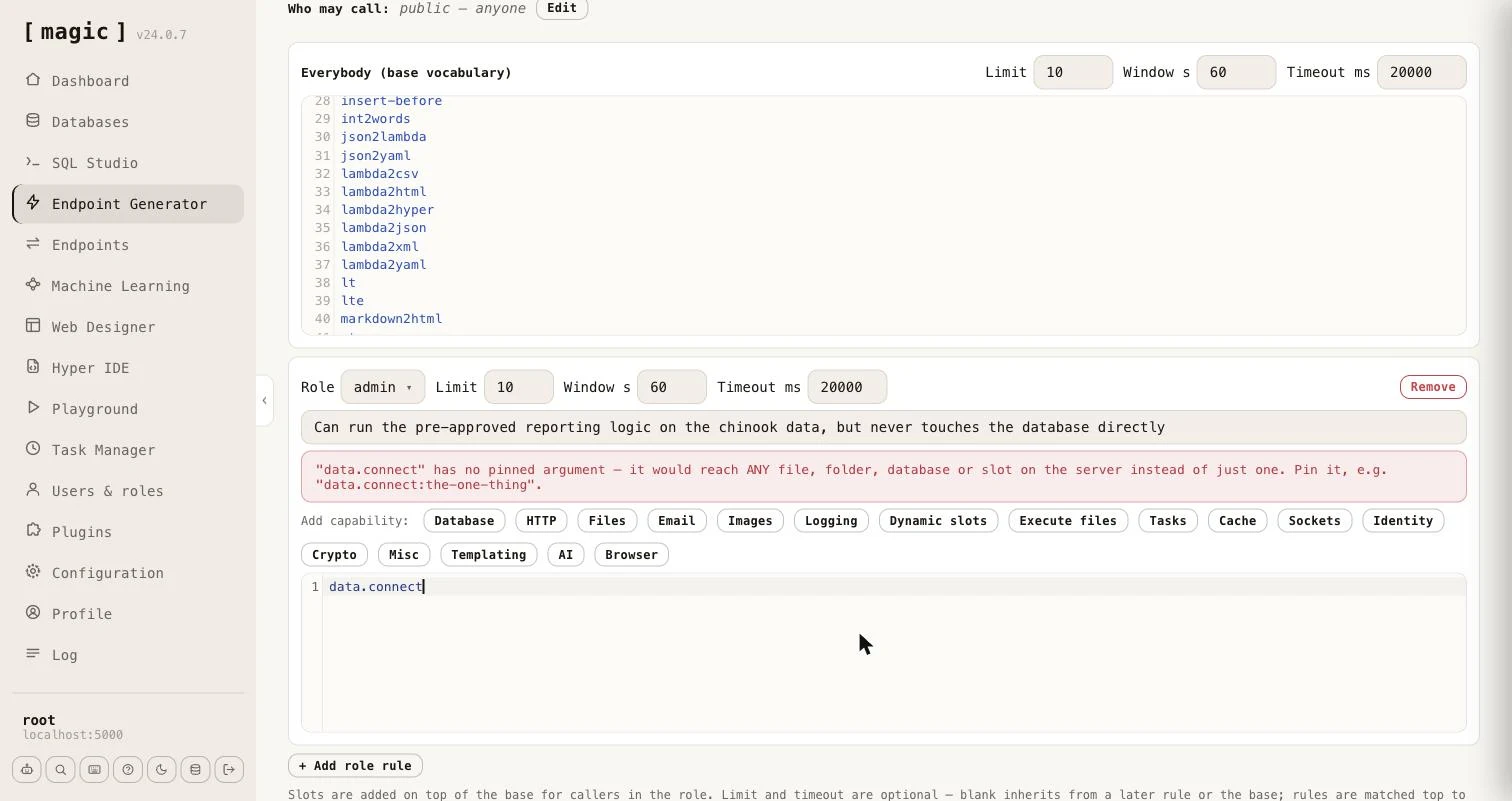
Each role rule also has a one-line description field - “What can this role do?” - which you can leave empty. Everything you write there is added to the generated endpoint’s file level comment as a list of roles, which is what an AI agent reads as the tool’s description. It should say what the role can accomplish, in plain words, such as “Can run the pre-approved reporting logic on the chinook data, but never touches the database directly”.
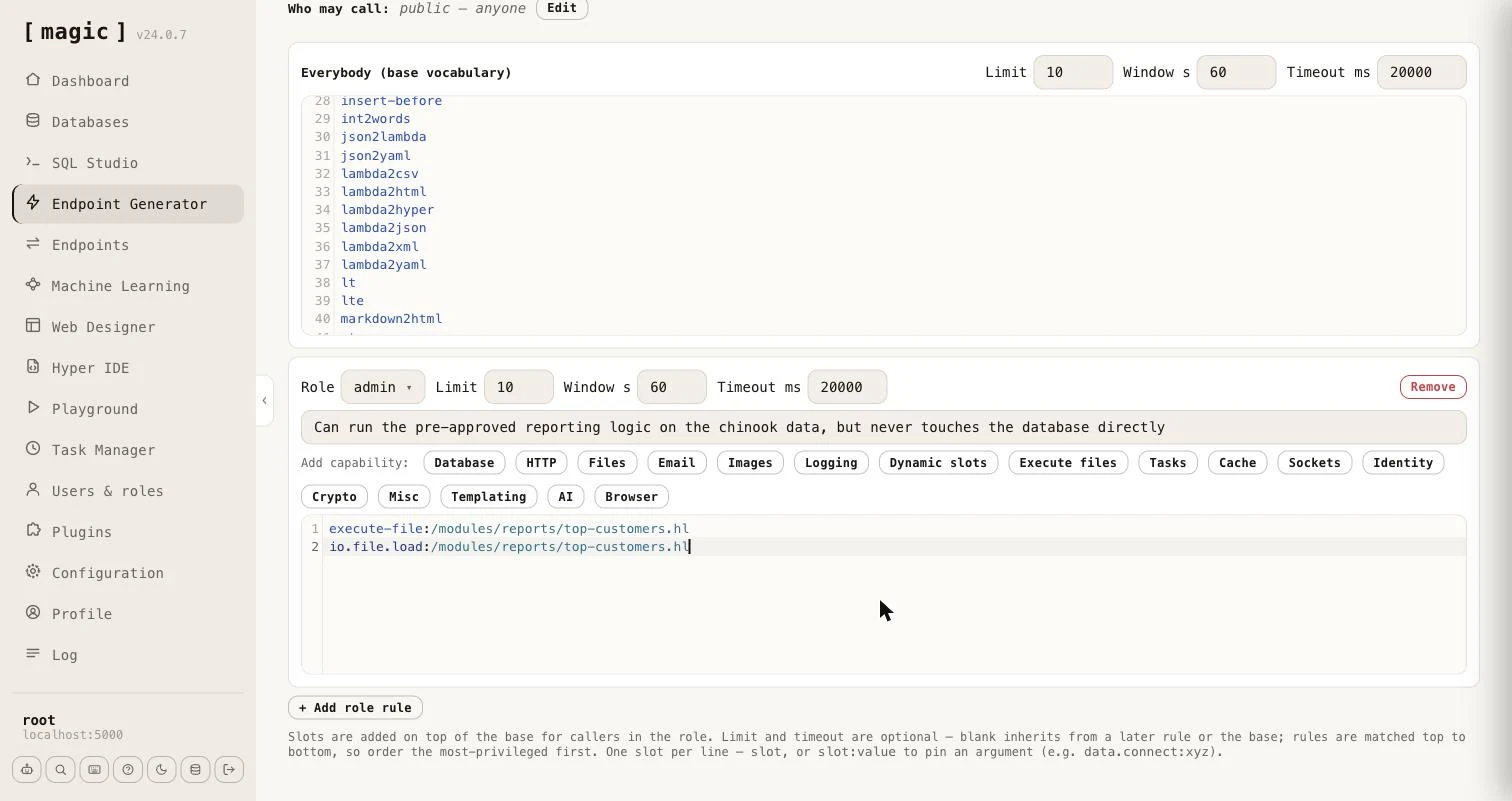
The editor warns you when a grant is wider than you probably intended. A function whose argument is what confines it - [data.connect], every file and folder function, [execute], [signal], [try-signal], [execute-file] and [io.file.execute] - reaches anything on the server when it has no pinned argument, so a bare line for any of them shows a warning telling you to pin it.
Capability wizards
Typing function names by hand is error-prone, so each role rule carries a row of wizards that write the correct lines for you. The “Add capability” buttons cover Database, HTTP, Files, Email, Images, Logging, Dynamic slots, Execute files, Tasks, Cache, Sockets, Identity, Crypto, Misc, Templating, AI, and a headless Browser. The Database wizard lets you pick a database and tick Read, Create, Update and Delete, and writes the pinned [data.connect] line plus a function per operation. The Files wizard grants Read, Write and/or Delete and can pin them all to a folder, and to an extension. Deliberately omitted are configuration - which would expose secrets - and ticket minting, which is the one escalation the sandbox exists to prevent, so the Identity wizard is read-only.
Two of the wizards work differently from the rest, because they grant code you wrote rather than functions - which is the subject of the next section.
Business logic without raw access
A whitelist answers “which functions may this role call?” Often the better question is “which results may this role get?” A role that should be able to see your top customers does not need [data.connect], [data.read], and the freedom to write SQL. It needs one piece of code that you wrote and reviewed, which returns exactly what it should and nothing else.
That piece of code is an ordinary Hyperlambda file. You write it the way you would write any other Hyperlambda - in Hyper IDE, or by letting an AI agent create it over MCP - and it can be as complex as the job requires. A file in a module, such as the following, validates its own arguments and then talks to the database.
/*
 * Returns the customers who have spent the most.
 */
.arguments

   // Optional number of customers to return, between 1 and 100. Defaults to 10.
   limit:int

validators.default:x:@.arguments
   limit:int:10
validators.integer:x:@.arguments/*/limit
   min:int:1
   max:int:100

data.connect:chinook
   data.select:@"
select c.FirstName || ' ' || c.LastName as name, sum(i.Total) as total
   from Customer c
   inner join Invoice i on i.CustomerId = c.CustomerId
   group by c.CustomerId
   order by total desc
   limit @max_rows"
      max_rows:x:@.arguments/*/limit
   return-nodes:x:@data.select/*
Save it as /modules/reports/top-customers.hl. A file name without an HTTP verb in it, such as this one, is not an endpoint, so nobody can invoke it over HTTP - it can only be reached by code that executes it.
Granting the file instead of its functions
Open a role rule and click “Execute files”. The wizard lists every Hyperlambda file under /modules/, filterable, with a ”?” button next to each showing the file’s description and its arguments. Tick the files this role may run - the “Select all filtered” checkbox ticks everything the filter currently shows - and click “Add”.
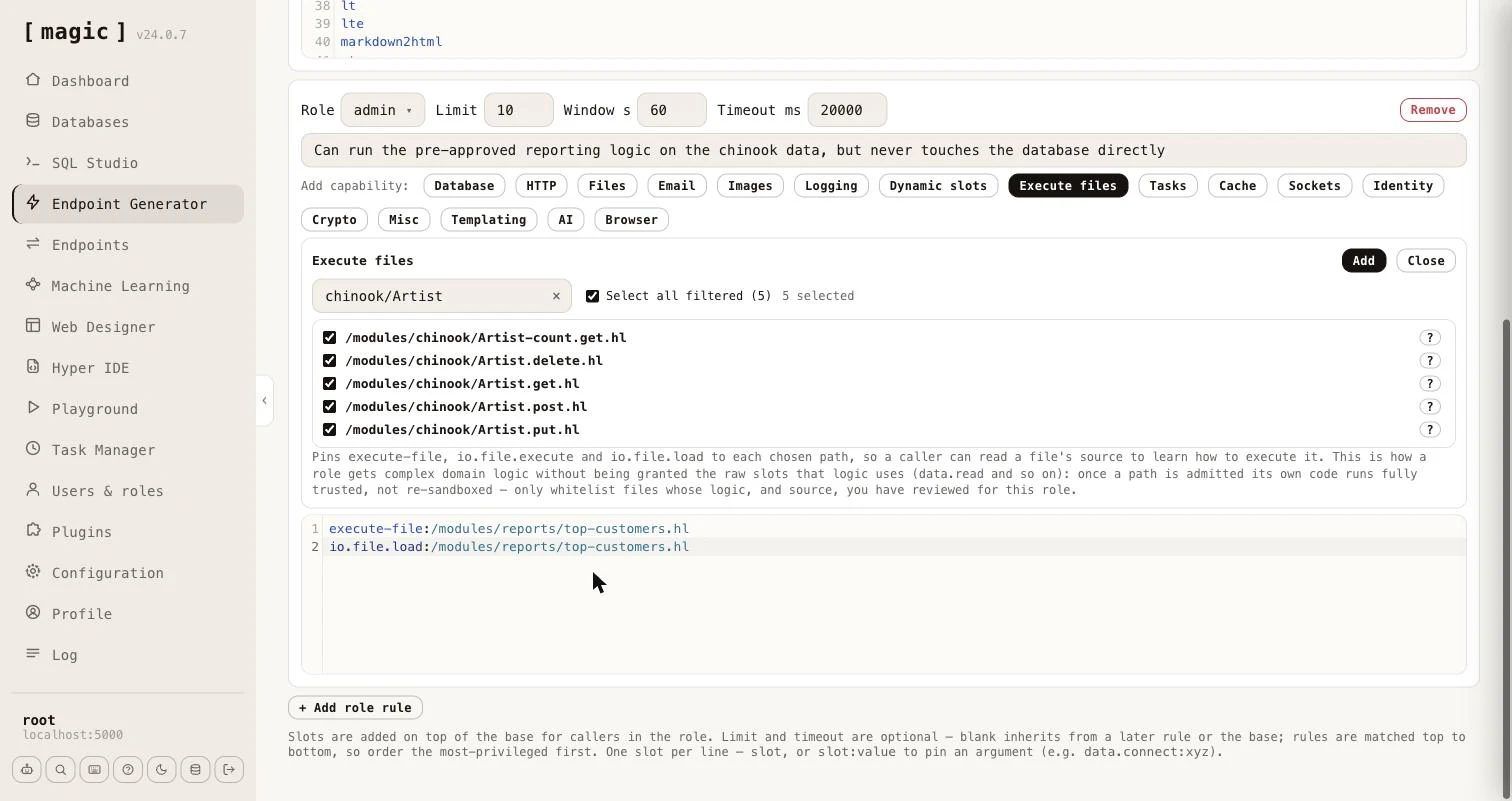
For every file you tick, the wizard writes three lines, each pinned to exactly that path.
execute-file:/modules/reports/top-customers.hl
io.file.execute:/modules/reports/top-customers.hl
io.file.load:/modules/reports/top-customers.hl
The first two let the role run the file, and [execute-file] and [io.file.execute] are the same operation under two names, so both are granted. The third lets the role read the file’s source, so a caller - typically an AI agent - can learn what arguments it takes and how it behaves before running it. The role is granted nothing else. It has no [data.connect], no [data.read], and cannot run SQL of its own.
A caller in that role can now do this.
execute-file:/modules/reports/top-customers.hl
   limit:int:5
return-nodes:x:@execute-file/*
The file runs, queries the database, and returns the five biggest spenders. If the same caller tries to reach the database directly - data.connect:chinook - the sandbox answers with the state rejected.
What makes this safe, and what you must still do
The whitelist stops applying to the code inside a file it admitted, exactly as it already does inside a dynamic slot. Without that, the file’s own [data.connect] would be refused, and the whole idea would be pointless. This is deliberate, and it moves the responsibility into the file, so a few rules matter.
- Review the file, and its source. Whatever you grant runs with the server’s full vocabulary, and the role can read the source through [io.file.load], so keep credentials and anything secret out of it. The wizard says so, too.
- Validate arguments inside the file. The caller chooses the arguments. Use validators as the example does, pass values to SQL as parameters, and never build SQL, file paths or URLs by concatenating what the caller sent.
- Never run caller supplied code inside the file. A file that evaluates a lambda it was given would hand the caller the full vocabulary again.
- Pin the path. Prefer an exact path to a wildcard, so that a new file dropped in the folder later does not silently become part of the role.
The “Dynamic slots” wizard is the same idea for logic held in a dynamic slot, created at runtime with [slots.create], which is kept in memory only. It grants [execute], [signal] and [try-signal], each pinned to the slot name. Files are the better choice for anything that has to survive a restart.
Root, throttling and the timeout
Two settings sit above the policy.
- Root bypasses the sandbox - when on, a caller in the
rootrole runs with the server’s full vocabulary and no whitelist at all. Root is trusted completely, so it is also never rate limited and never timed out, whether or not this is on - the setting only controls whether root additionally escapes the vocabulary restriction. - Return code - when on, the response includes the generated or supplied code; when off, only the state, result and any reason come back, which is usually what an application calling the endpoint wants.
Rate limiting is per role, keyed by the caller’s IP address, and the timeout cancels execution after the configured number of milliseconds - a caller’s own code can shorten it, but never extend it.
Who may call
The “Who may call” row gates the endpoint itself, exactly as for the other generators - leave it empty for a public endpoint, or name the roles allowed to invoke it. A caller who gets past that gate is then further constrained by the policy.
When the endpoint is saved, the generator offers “Open in Endpoints” and “Open in Hyper IDE” next to the preview of what it wrote.
Asking what is permitted - describe
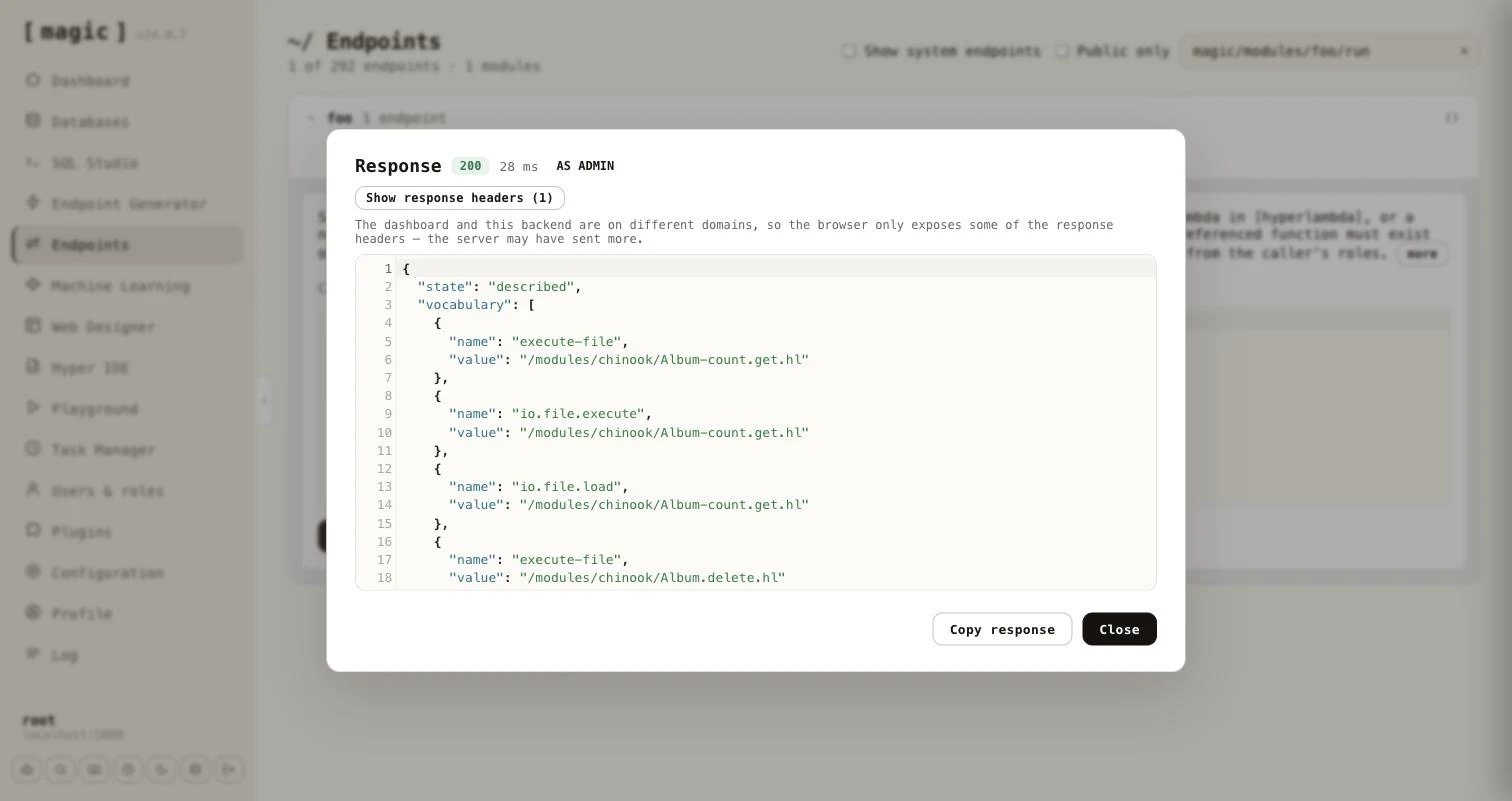
Every generated endpoint accepts a [describe] argument. Set it to true instead of sending code, and the endpoint tells the caller what it may do, without executing anything and without counting against its rate limit.
{
  "state": "described",
  "vocabulary": [
    { "name": "add", "value": null },
    { "name": "execute-file", "value": "/modules/reports/top-customers.hl" },
    { "name": "io.file.load", "value": "/modules/reports/top-customers.hl" }
  ],
  "limit": 10,
  "window": 60,
  "timeout": 20000
}
The [vocabulary] is a list with one entry per granted function, carrying its [name] and its pinned [value], which is null when the function is not pinned. It is a list, and not an object keyed by name, because the same function can be granted several times with different pinned values. The [limit], [window] and [timeout] tell the caller how many calls it may make per window of seconds, and how many milliseconds a call may run. They are left out for root, which has neither. When “Root bypasses the sandbox” is on, root is told the server’s full vocabulary, together with root-bypass: true.
As an MCP tool, and discovery without MCP
Because the generated endpoint is an ordinary Hyperlambda endpoint, it is also an MCP tool. Its file level comment becomes the tool’s description. The generator writes it to match the input mode, lists every role’s description as a markdown list, and tells the calling model to call the tool with [describe] set to true to learn its capability surface.
 * Accepts caller-supplied Hyperlambda in [hyperlambda], or a natural-language
 * [instruction] the Hyperlambda Generator turns into code.
 *
 * Roles:
 *
 * - **admin**: Can run the pre-approved reporting logic on the chinook data
An agent that is not connected over MCP can still find these endpoints. The first time the generator saves a Sandbox API endpoint, it creates /etc/www/.well-known/ if it is missing, together with a pair of files - hyperlambda-agent.html and its code-behind hyperlambda-agent.hl, created from templates and never overwritten afterwards. Every endpoint the generator saves is then added to the code-behind, replacing its earlier entry when you regenerate it. Fetching /.well-known/hyperlambda-agent on your cloudlet returns JSON an agent can read without any setup.
{
  "about": "Sandboxed Hyperlambda endpoints on this server. ...",
  "base": "https://your-cloudlet.example.com",
  "endpoints": [
    {
      "path": "magic/modules/foo/run",
      "verb": "post",
      "description": "Sandboxed Hyperlambda endpoint, generated by ...",
      "auth": "admin"
    }
  ]
}
Each entry has the endpoint’s [path] relative to [base], its [verb], its [description], and [auth] only when you restricted who may call it. The code-behind is a plain, readable file, so you can prune or edit the list by hand.
Testing an endpoint as a role
The Endpoints component and Hyper IDE both have a “Run as” dropdown next to “Invoke” - see Endpoints. Choose a role, invoke with [describe] set to true, and you see exactly what a caller in that role is permitted, without creating a user for it.
Search endpoint - searching a machine learning type
The “Search endpoint” tab generates a single HTTP endpoint that searches the training snippets of one machine learning type and returns the best matches. It is retrieval only - no AI model is invoked - which makes it a cheap and fast way to put your own knowledge behind an API, a website’s search box, or an AI agent.
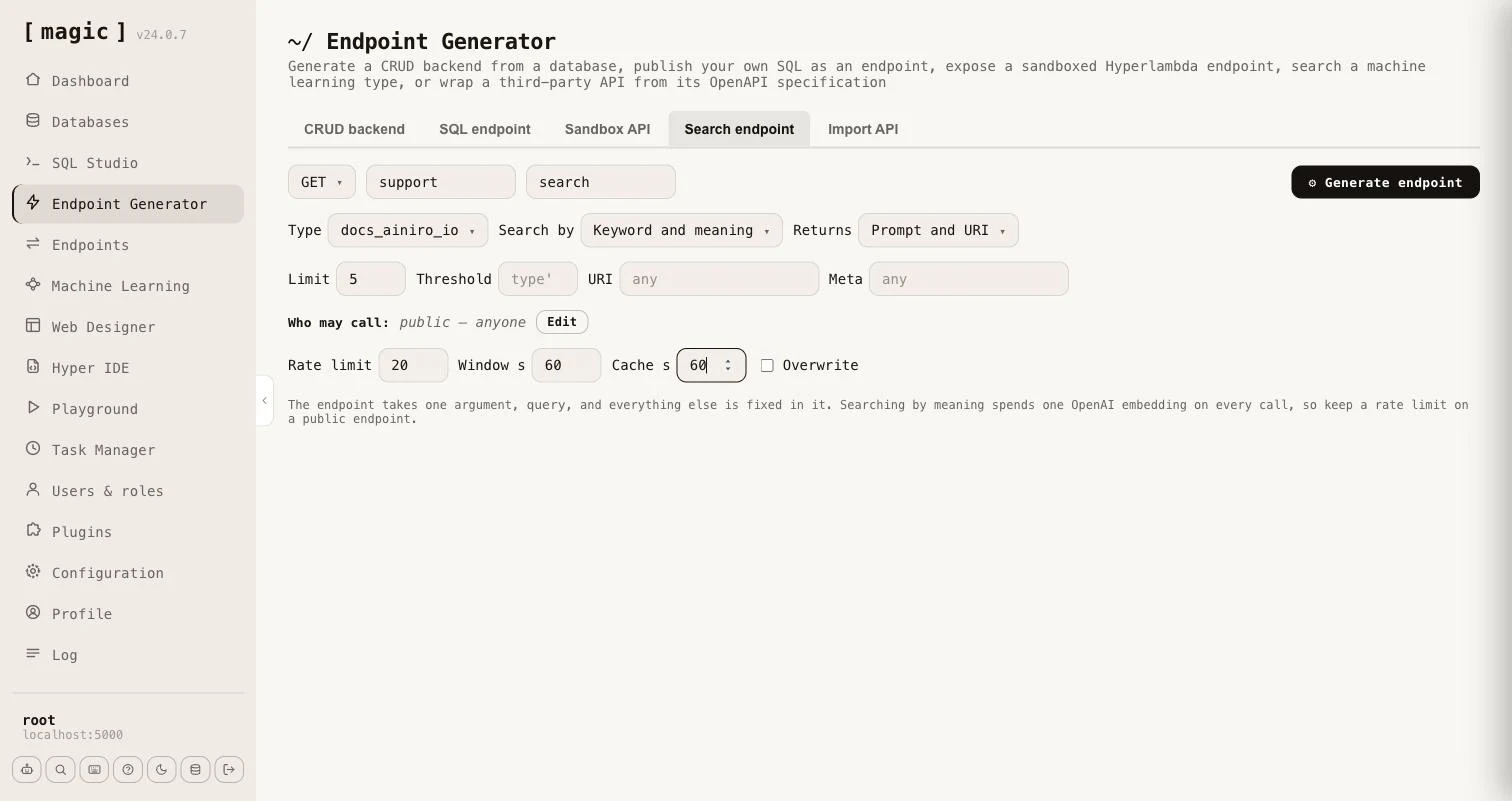
Everything except the query is fixed in the generated endpoint, so a caller cannot choose the type, the search mode or how much comes back. The endpoint takes one argument, [query], and you choose the rest when you generate it.
- Type - the machine learning type whose training snippets are searched.
- Search by - the type’s own setting, or Keyword (BM25), Keyword and meaning, or Meaning. A search by meaning is always widened with keywords, unless the query has no words to match.
- Returns - Prompt and URI, or Prompt, completion, URI and meta. The snippet’s internal id never leaves the endpoint.
- Limit and Threshold - how many matches come back, and how similar a match must be. Leave the threshold empty to use the type’s own.
- URI and Meta - optionally restrict the endpoint to snippets belonging to one URL, or whose meta fits a pattern in which
%matches any text, such asFACT ==> %. Snippets that declare functions and widgets are never returned. - Who may call - exactly as for the other generators. Leave it empty for a public endpoint.
- Rate limit and Window - how many calls an IP may make per window of seconds. It defaults to 20 per 60 seconds, root is exempt, and 0 means no limit.
- Cache - a number of seconds the caller may cache an answer, sent as a Cache-Control header, and marked private when the endpoint is restricted to roles.
Searching by keyword needs no OpenAI key and costs nothing per call. Searching by meaning, or by both, spends one OpenAI embedding on every uncached call, so the tab reminds you to keep a rate limit on a public endpoint.
The generator writes a file level comment saying what the endpoint searches and returns, so it works as an MCP tool without any further work. Use “GET” for an endpoint a website can call directly, and “POST” if you prefer a body. Unlike the built-in public search endpoint, which takes the type as an argument, a generated endpoint has the type built in, its own URL, its own authorisation and its own response shape.
Import API - wrapping a third party API
The fifth tab in the Endpoint Generator, “Import API”, works the other way around from the other four. Instead of generating endpoints from your own database or your own SQL, it reads an OpenAPI specification belonging to somebody else’s API - Stripe, GitHub, Slack, or any other API that publishes one - and generates Hyperlambda endpoints in your cloudlet wrapping the operations you choose.
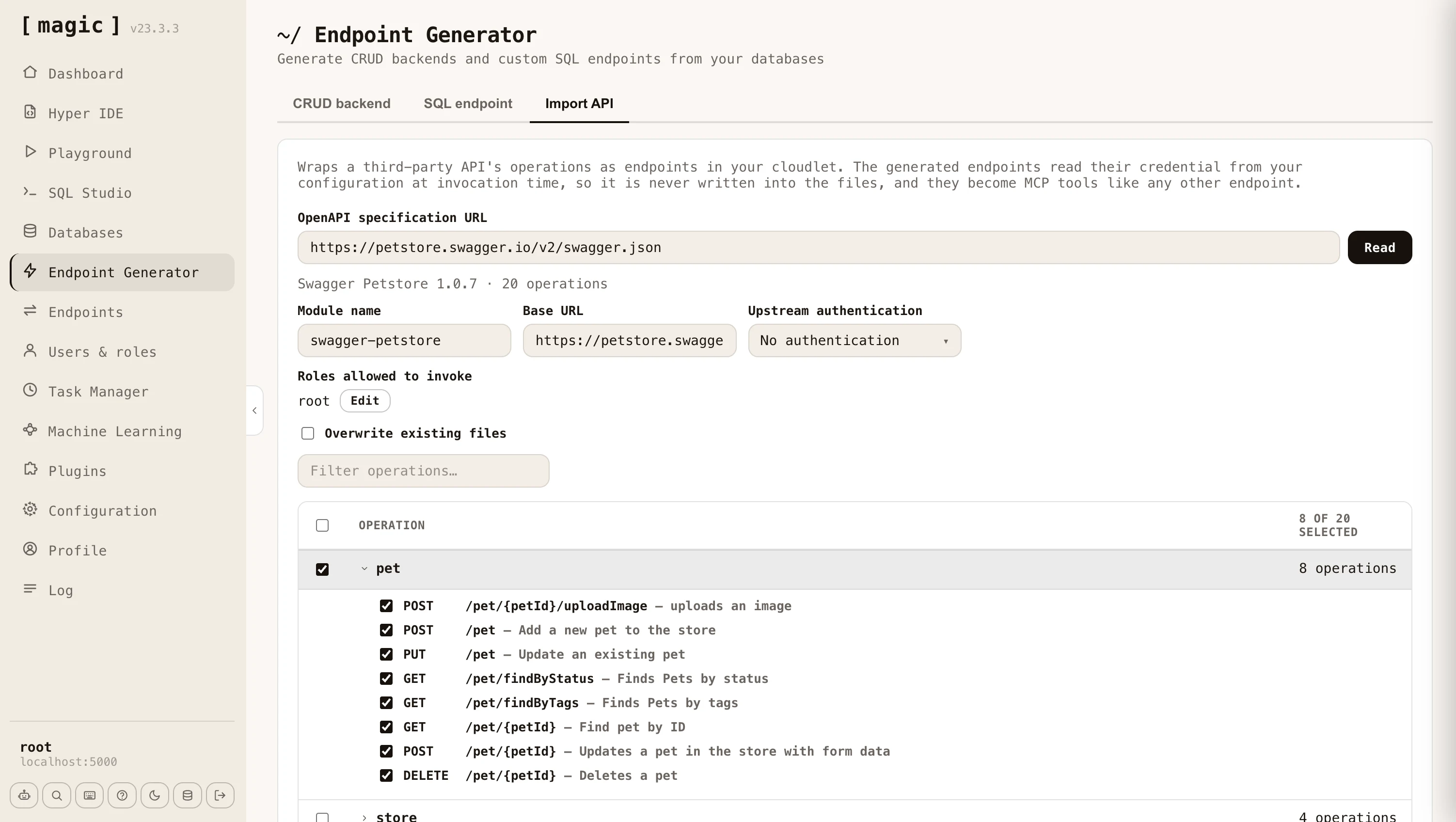
Paste the URL of the specification and click “Read”. Magic fetches and parses it, then shows you every operation it found, grouped by the specification’s own tags - or by the first meaningful segment of the path for specifications that don’t use tags. Tick the operations you want, give the module a name, and click “Import”. A terminal dialog reports each endpoint as it is created, and tells you how many lines of Hyperlambda it generated when it finishes.
Both major dialects are supported - OpenAPI 3.x and the older Swagger 2.0 - in either JSON or YAML. Specifications range from a handful of operations to well over a thousand, so the filter box and the group checkboxes let you pick out just the parts of an API you actually intend to use.
Arguments and documentation
The generated endpoints are ordinary Hyperlambda endpoints, and they are documented from the specification as they are generated. URL parameters, query parameters, and form fields each become a named, typed argument with its own comment stating the type, whether it is required, its default value, the values it accepts, and the description the specification gave it. Required arguments get a [validators.mandatory] invocation, so a missing argument is refused before the upstream API is ever contacted.
This matters beyond readability. Magic exposes the file level comment as an endpoint’s description and each argument’s comment as that argument’s description, which is exactly what an MCP client reads when deciding how to call a tool. An imported API therefore arrives as a set of self describing tools an AI agent can use without any further work from you.
Authentication towards the upstream API
Most third party APIs require a credential. You choose how the generated endpoints should authenticate - a bearer token, a custom header, a query parameter, or nothing at all - and which configuration key the credential is read from. The credential itself is never written into the generated files. It is read from your configuration at the moment the endpoint is invoked, so your files stay safe to check into source control. The “Set” button next to the configuration key lets you store the credential without leaving the component.
You also declare which of your own roles are allowed to invoke the generated endpoints, exactly as you do for CRUD endpoints, so wrapping a third party API does not implicitly expose it to everybody.
Request bodies
Magic generates different code depending upon what the operation expects, which it reads from the specification.
- JSON - The endpoint takes a [payload] argument, and the fields the specification declares are documented above it, nested objects included.
- Form encoded - Each field becomes a named argument of its own, unless the specification nests objects deeply enough to require bracketed keys, in which case the endpoint keeps a single [payload] argument.
- Multipart - The endpoint accepts a file upload, and forwards it to the upstream API under the field name the specification asks for.
- Binary - The endpoint accepts the raw request body and passes it on untouched, which is what APIs accepting an image or a document directly expect.
By default the importer refuses to replace an endpoint that already exists, telling you which file was in the way. Tick “Overwrite existing files” to re-import over an existing module, which is what you want when the upstream specification has changed and you need to regenerate.
HTTP verbs
The CRUD endpoint generator creates endpoints wrapping the POST, GET, PUT, and DELETE verbs, while the SQL and Sandbox API generators can additionally wrap PATCH, and the Search endpoint generator wraps GET or POST.
- POST - Typically used for creating or inserting new items
- GET - Typically used for retrieving or counting records
- PUT - Typically used for updating values in your database
- PATCH - Alternative to PUT with similar semantics, typically when adding new fields (SQL and Sandbox API generators)
- DELETE - Typically used when deleting records in your database.
Frequently asked questions
What does the Endpoint Generator do?
It reads metadata from your database and automatically generates a complete CRUD web API wrapping it, secured according to your instructions. What would normally take weeks of coding is done in seconds.
Which databases can it wrap?
Any MySQL, PostgreSQL, SQL Server, MariaDB, or SQLite database - including existing legacy databases, which makes it a fast way to put a modern, secure API on top of an old system.
Which endpoint types can it generate?
POST, GET, PUT and DELETE endpoints for each table, plus additional GET endpoints such as count, aggregate, distinct, and a keyword density search endpoint.
What is keyword density search?
A search endpoint that ranks each row by how many of your keywords it matches, sorting by most matches first. It is a good substitute for RAG and VSS - no embeddings, no vector database, no AI inference - yet often yields surprisingly relevant results.
Is the generated API secure?
Yes. You declare which roles can invoke each verb, and the generator takes care of authentication, authorisation, validators, and referential integrity - plus optional logging of create, update and delete invocations.
Does caching apply to all generated endpoints?
No. Caching, implying the Cache-Control HTTP header, is only applied to GET endpoints in this component.
What is the fastest way to create an API?
The dashboard's landing page has an 'API Wizard' card starting a guided version of the Endpoint Generator - it preselects every table in your database, and when generation is done it links you directly to your new endpoints and to user management.
Can I wrap somebody else's API instead of a database?
Yes. The Import API tab reads an OpenAPI specification - OpenAPI 3.x or Swagger 2.0, JSON or YAML - and generates Hyperlambda endpoints wrapping whichever operations you select, complete with arguments, validators and documentation taken from the specification.
Where is the credential for an imported API stored?
In your configuration, never in the generated files. You nominate a configuration key, and the generated endpoints read the credential from it at invocation time, which keeps your files safe to check into source control.
Do imported endpoints work as MCP tools?
Yes. The importer writes the operation's summary as the file level comment and each argument's documentation as a comment above that argument, which is what Magic exposes as the tool's description and its arguments' descriptions - so an imported API becomes a set of self describing tools for an AI agent.
Can I wrap my own SQL in an endpoint?
Yes. The SQL endpoint tab lets you provide any SQL statement, declare arguments you reference as @name in the SQL, choose an HTTP verb and authorisation, and generate a secure endpoint wrapping it. The AI prompt bar can even write the SQL for you, and you can load saved snippets or import .sql files.
What is the Sandbox API tab?
It generates one endpoint that safely executes code its own callers supply - Hyperlambda, or plain English turned into Hyperlambda - inside a whitelist you define per role. Callers can only reach the functions you granted, a function you did not grant does not exist as far as their code is concerned, and a hallucinated function is refused before anything runs.
How do I limit what a Sandbox API caller can do?
You build a policy from an 'everybody' base vocabulary plus per-role rules that add functions on top. A caller runs with the union of the functions their roles grant, so you can, for example, give one role access to a specific database while another role cannot reach it. The rate limit and the execution timeout are set per role too, and root is trusted completely - never sandboxed, throttled, or timed out.
How can a role run complex business logic without access to the raw resources behind it?
Put the logic in a Hyperlambda file, and grant the role that one file with the Execute files wizard instead of the functions the file uses. The file runs fully trusted, so it can read a database or call an API the role itself can never touch - the caller can only run exactly what the file does, with the arguments it accepts. You review the file once, and the role never gets raw access.
Can the Sandbox API run a natural-language instruction?
Yes. Choose the natural-language or 'both' input mode, and the endpoint sends the instruction to the Hyperlambda Generator, verifies every function the generated code references actually exists, and runs it inside the same whitelist. The response says whether it executed, and why not when it was refused.
Does the Sandbox API endpoint work as an MCP tool?
Yes. The generator writes the endpoint's file level comment to match its input mode, which Magic exposes as the tool's description, and the comment even tells the calling model how to discover its own capability surface - by calling the tool with describe set to true. Each role's one-line description is added to the comment too. An AI agent can therefore learn exactly which functions a given sandbox permits before it calls it.
How does a caller find out what a Sandbox API permits?
It calls the endpoint with describe set to true instead of sending code. The endpoint answers with the functions that particular caller may use - each with its pinned value, if it has one - plus the rate limit and timeout that apply to it. Nothing is executed, and the call does not count against the rate limit.
Can I discover Sandbox API endpoints without MCP?
Yes. Every time the generator saves a Sandbox API endpoint, it lists the endpoint in /.well-known/hyperlambda-agent on your cloudlet - a JSON document an agent can fetch without any prior setup, then call each listed endpoint with describe set to true.
How do I check what a particular role can really do?
Open the endpoint in the Endpoints component, pick the role in the Run as dropdown, and invoke it with describe set to true. Magic mints a short lived token for that role and calls the endpoint with it, so you see exactly what a caller in that role would see.
What is the Search endpoint tab?
It generates one endpoint that searches the training snippets of a single machine learning type, by keyword (BM25), by meaning (vectors), or both. The type, the search mode and what comes back are fixed in the endpoint, so callers send only a query. It is retrieval only - no AI model is invoked.
Does a search endpoint cost anything per call?
Not when it searches by keyword - that needs no OpenAI key and no vectors. Searching by meaning, or by both, spends one OpenAI embedding on every call, which is why the tab applies a rate limit by default and can let the caller cache answers.