Endpoints
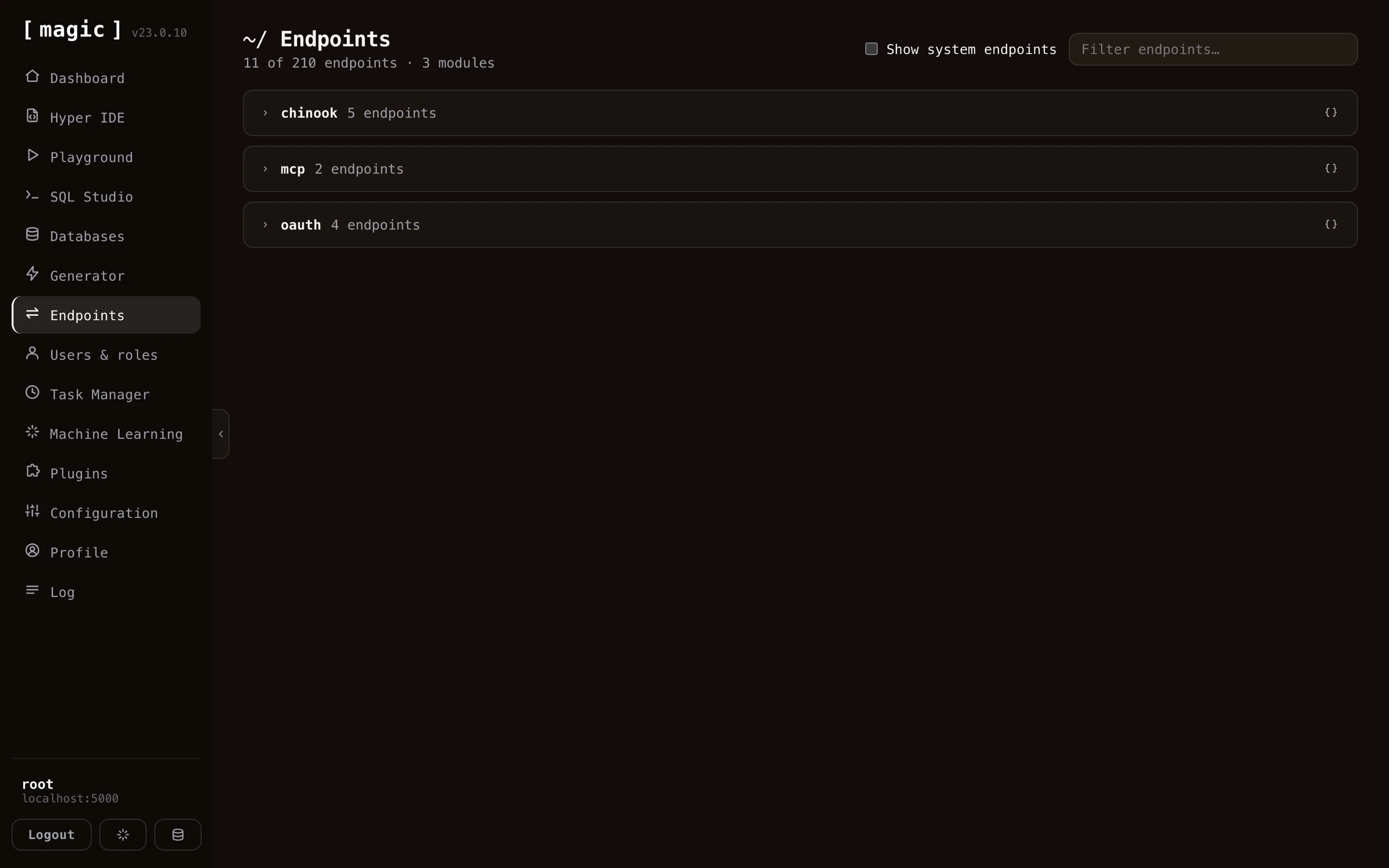
The Endpoints component allows you to see your HTTP endpoints, and invoke these, similarly to how Swagger works. From your endpoints menu item you can search for, parametrise, and invoke your endpoints - Allowing you to simulate a client, to understand how your endpoints work, and “debug” these as you develop them. This component hence serves two purposes; One being documenting your endpoints, another being testing your endpoints.
Parametrising your invocations
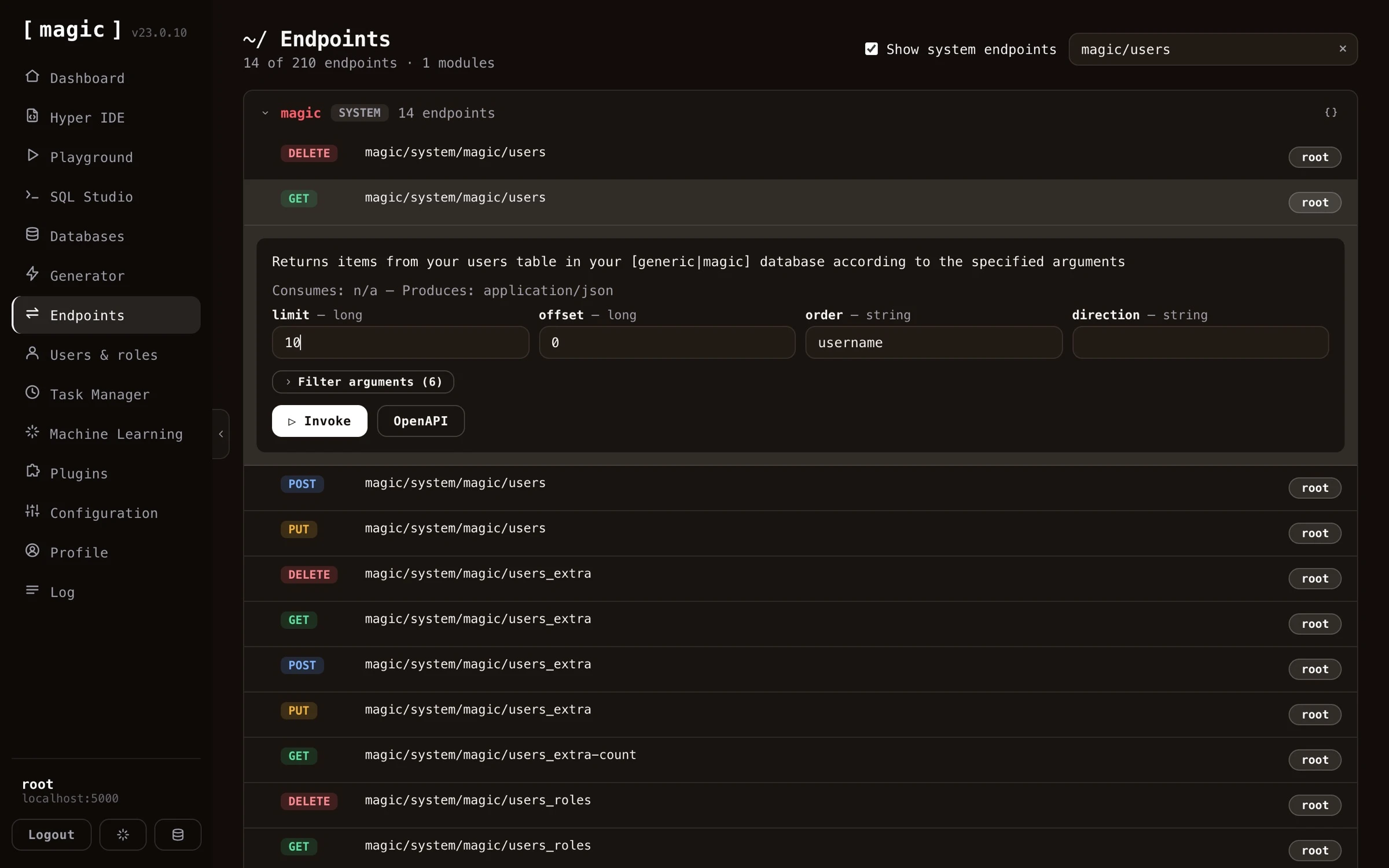
When you expand an endpoint, every argument the endpoint accepts becomes an input field, with its type displayed next to its name. For a CRUD read endpoint this means you can page with limit and offset, sort with order and direction, and expand the “Filter arguments” section to filter on individual columns - all without writing a single line of code.
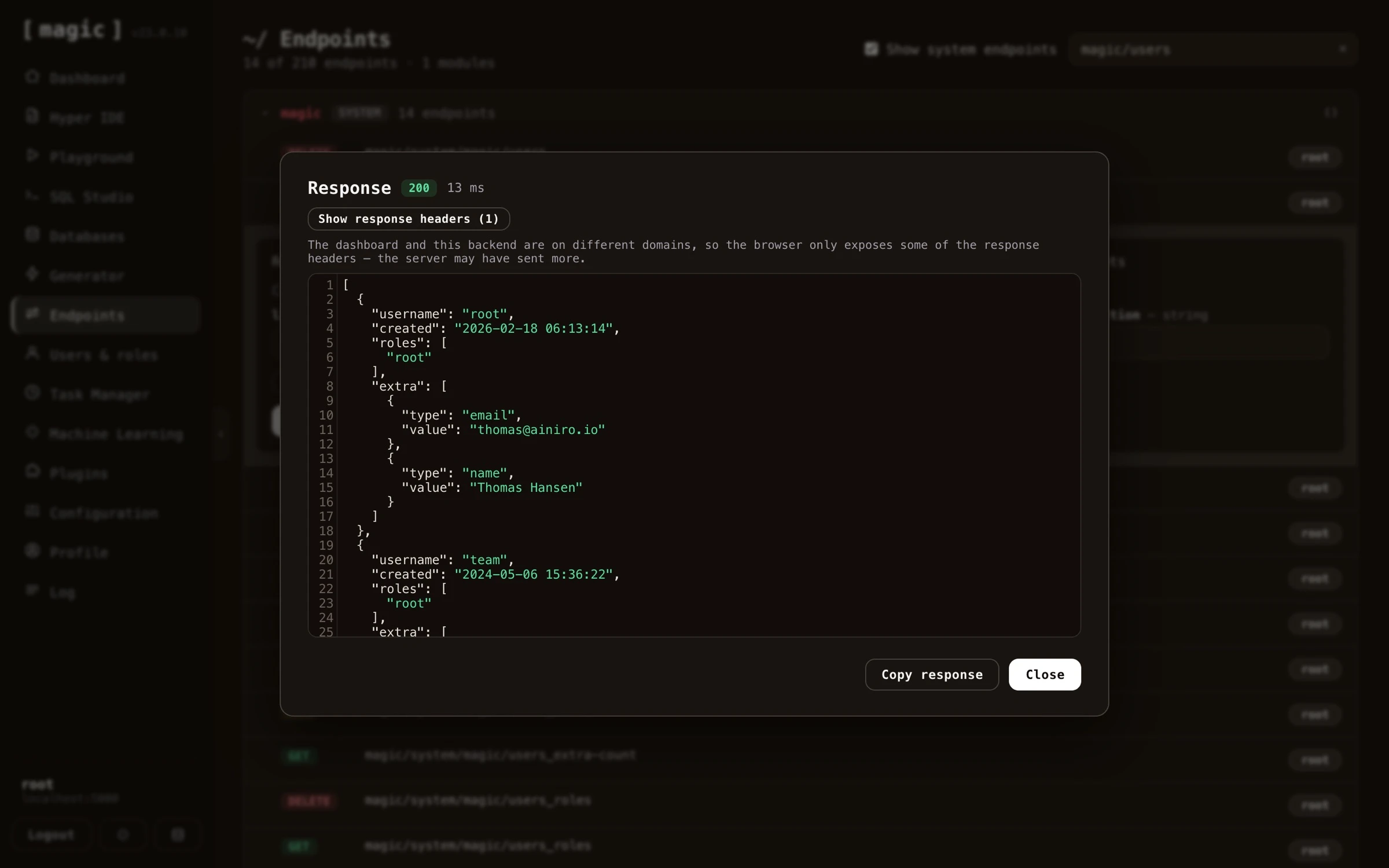
When you click “Invoke”, the component shows you the response; its HTTP status code, how many milliseconds the invocation took, the response headers, and the response body itself with syntax highlighting. A “Copy response” button lets you bring the result into your own code or documentation.
Run as - invoking an endpoint as a role
Endpoints are invoked as you by default, and you are usually root, who is allowed to do anything. That tells you little about what a real user will experience. The “Run as” dropdown next to “Invoke” lists every role on your cloudlet, and choosing one makes the invocation behave as if a caller holding only that role had made it.
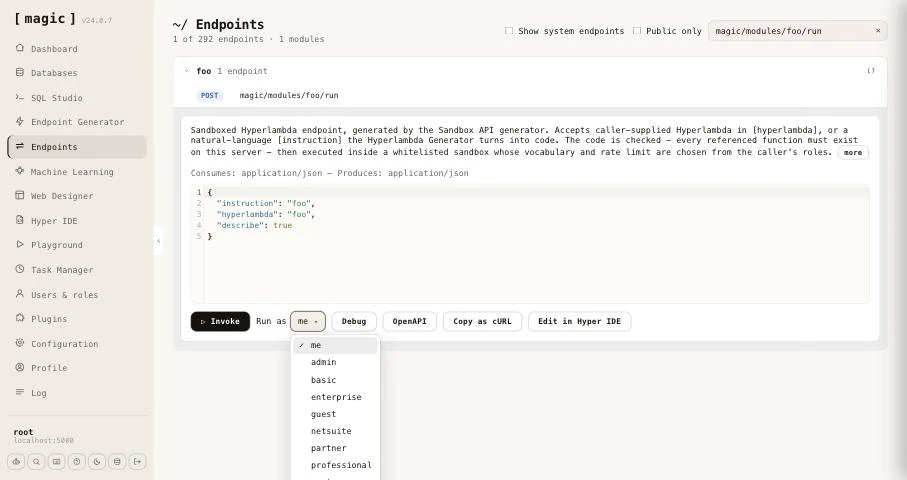
When you invoke with a role chosen, Magic mints a token for that role, valid for five minutes, and sends the request with it instead of yours. The endpoint’s authorisation requirements, and anything inside it that checks the caller’s roles, apply exactly as they do for a real caller - an endpoint restricted to admin refuses you when you run as guest, and answers when you run as admin. The response dialog carries a badge saying which role the call ran as, so you never mistake the result for a root invocation.
A few details are worth knowing.
- The choice is remembered for the rest of your browser session, and follows you from endpoint to endpoint, as well as into Hyper IDE, which uses the same invocation panel. Set it back to “me” when you are done.
- Copy as cURL writes
$TOKENas a placeholder as usual. With a role chosen it embeds the minted token instead, so the copied command runs as that role. The token is real and expires after five minutes, so treat it like any credential. - Debug always runs as you. Debugging executes the file’s code through the evaluator, which only root may use, so it cannot impersonate a role.
This is particularly useful together with the Sandbox API generator, where choosing a role and invoking with [describe] set to true shows you exactly what a caller in that role is permitted.
OpenAPI specifications
Every endpoint has an “OpenAPI” button, giving you the OpenAPI specification for that particular endpoint - and every module has one too, giving you the specification for all endpoints in the module at once.
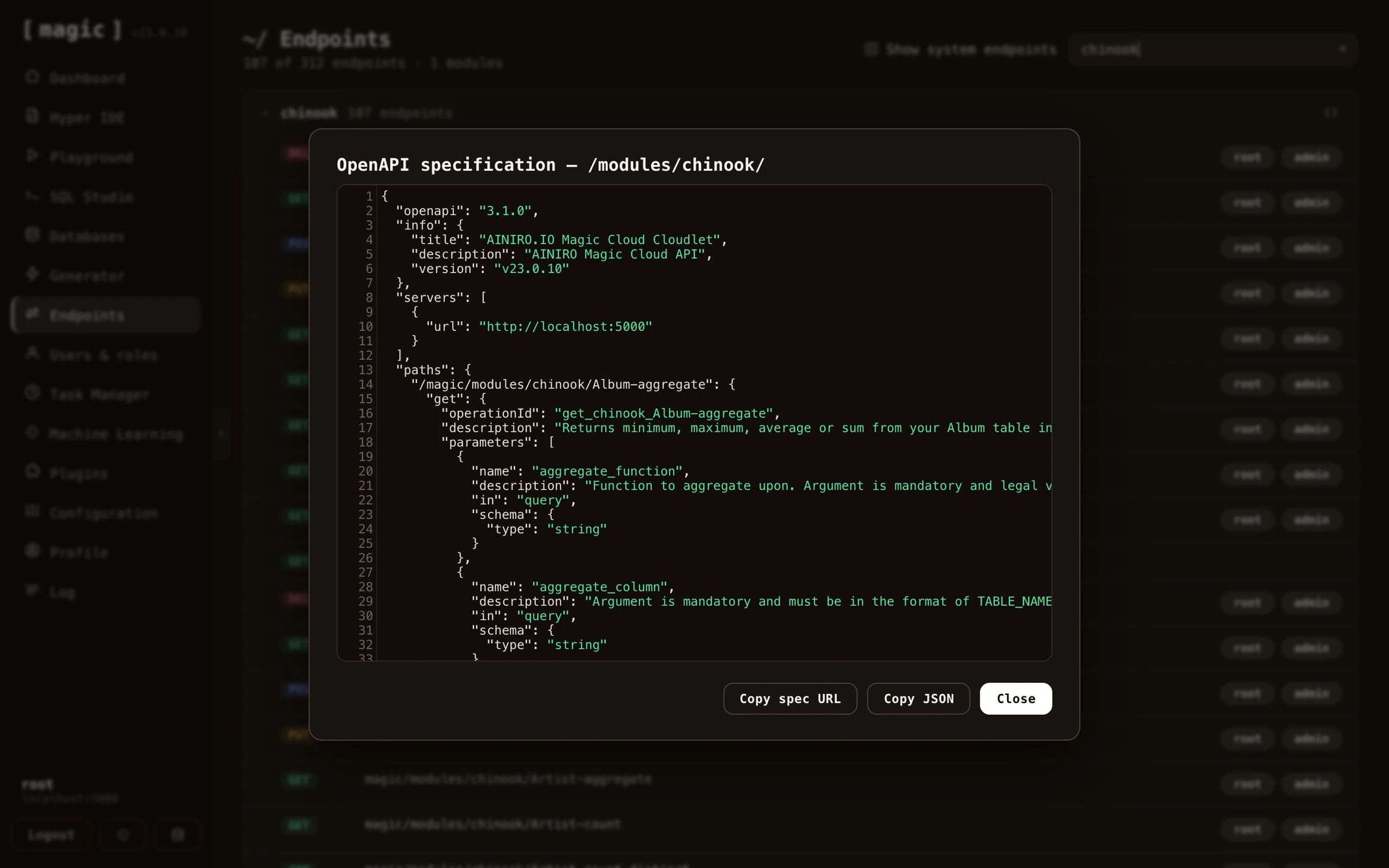 You can copy both the OpenAPI URL and the specification itself. This is particularly useful when working with AI - copy and paste the OpenAPI specification into some other orchestrator LLM or AI agent, and the other party immediately understands your backend; what endpoints exist, what arguments they take, and what they return - allowing the AI to correctly invoke your API, or generate a frontend consuming it.
The component also allows for uploading and downloading of files - you can upload files to endpoints accepting file uploads, and download the files an endpoint returns, allowing you to test binary and document endpoints directly from the component.
Your endpoints as MCP tools
Notice, if the MCP server is installed, all endpoints in your system are automatically added as “tools” to the MCP server - implying every endpoint you see in this component is also invocable by a connected AI agent. MCP tool invocations obey the same RBAC requirements as everything else; an agent can only invoke the endpoints its authenticated user’s roles permit.
Hyperlambda endpoint meta data
Hyperlambda endpoints have a type declaration providing some sort of semantic type of information about your endpoint, and typically if this type declaration is “internal”, the endpoint is not intended for being consumed by your own code, but only for internal usage by Magic. This meta data is displayed in the endpoint component, and allows you to more easily classify your endpoints, understanding what an endpoint does.
Magic will automatically determine what type your query parameter is, and show the correct form control in its endpoint component for whatever type is required as input to your endpoint. This implies it will show checkbox elements for boolean arguments, date time pickers for date and time arguments, etc. This component also supports providing request payloads to your POST, PUT and PATCH endpoints in all the most common formats - such as JSON, YAML, Hyperlambda, and XML - with syntax highlighting through CodeMirror. In addition you can upload files to endpoints that accept file uploads, and download the files an endpoint returns, allowing you to work with binary and document endpoints directly from the component.
Endpoint meta data features
As you are browsing your endpoints, and you expand individual items, you’ll notice that each endpoint shows you a whole range of “meta data”. This gives you high level information about your endpoints, such as:
- Relative URL
- HTTP verb
- Type of endpoint
- What type of data the endpoint consumes (JSON, Hyperlambda, form-data, etc)
- What type of result the endpoint produces
- Humanly readable description of your endpoint
- Authorisation requirements for invoking the endpoint, implying roles users must belong to in order to invoke the endpoint
- Etc, etc, etc
The endpoint’s meta information is retrieved directly from your Hyperlambda files. Magic automatically allows you to invoke your user defined endpoints with this component.
Every endpoint also has a source code button, opening the Hyperlambda file implementing the endpoint directly in Hyper IDE. This takes you from “this endpoint misbehaves” to editing its implementation in a single click - and since Hyperlambda endpoints are resolved per request, saving your change makes it live immediately, allowing you to invoke the endpoint again from this component to verify your fix.
The endpoints component in Magic is obviously not as strong as something such as OpenAPI, Swagger, or Postman - But for Hyperlambda endpoints, it’s probably more than enough.
Frequently asked questions
What is the Endpoints component?
It lets you browse every HTTP endpoint in your cloudlet and invoke them, similarly to how Swagger works - documenting your endpoints and letting you test them from the same screen.
How do I parametrise an invocation?
When you expand an endpoint, every argument it accepts becomes a typed input field - checkboxes for booleans, date pickers for dates, and so on. CRUD endpoints additionally expose paging, sorting, and per-column filter arguments.
Which payload formats are supported?
JSON, YAML, Hyperlambda, and XML - all with syntax highlighting - for your POST, PUT and PATCH endpoints. Endpoints consuming multipart/form-data are also supported, rendering one input field per form field, in addition to letting you attach files.
Can I see the code behind an endpoint?
Yes. Every endpoint has a source code button opening its Hyperlambda file directly in Hyper IDE, taking you from 'this endpoint misbehaves' to editing its implementation in one click.
Can I get an OpenAPI specification for my endpoints?
Yes. Every endpoint has an OpenAPI button giving you its OpenAPI specification. You can copy both the URL and the specification itself, and paste it into another orchestrator LLM or AI agent, allowing the other party to understand your backend.
Can I test file uploads and downloads?
Yes. You can upload files to endpoints that accept file uploads, and download the files an endpoint returns, directly from the component.
Can I invoke an endpoint as a specific role?
Yes. Next to Invoke there is a Run as dropdown listing every role on your cloudlet. Choose one, and Magic mints a short lived token for that role and calls the endpoint with it, so the endpoint's own authorisation and role checks apply exactly as they would for a user holding only that role. The response dialog shows which role the call ran as.
Does Copy as cURL include a token?
Normally it writes $TOKEN as a placeholder, so the command is safe to paste into scripts and share. When a role is chosen in Run as, it instead embeds a freshly minted token for that role, valid for five minutes, so the copied command really runs as that role.
What does the response dialog show?
The HTTP status code, how many milliseconds the invocation took, the response headers, and the response body with syntax highlighting - plus a button to copy the response.